
Skip to content
NexStep Technologies

Software / Precise by design

Software for the stage you're in.

Custom software development, from a first business website to a real-time trading platform: products that are structured, fast and easy to grow. Here is exactly what we make, who it suits and what you receive.

Who this helps

  • Founders turning an idea into a first real product
  • Businesses ready to move off spreadsheets and manual work
  • Teams that need a trading, fintech or real-time platform built carefully

01

Structure first

We map the data, roles and flows before we design a single screen.

02

Interfaces that stay legible

Dense information is organised so people can find and act on it quickly.

03

Built to change

Clean components and clear boundaries, so the next feature does not mean a rewrite.

Software / Real project

A live build, screen by screen.

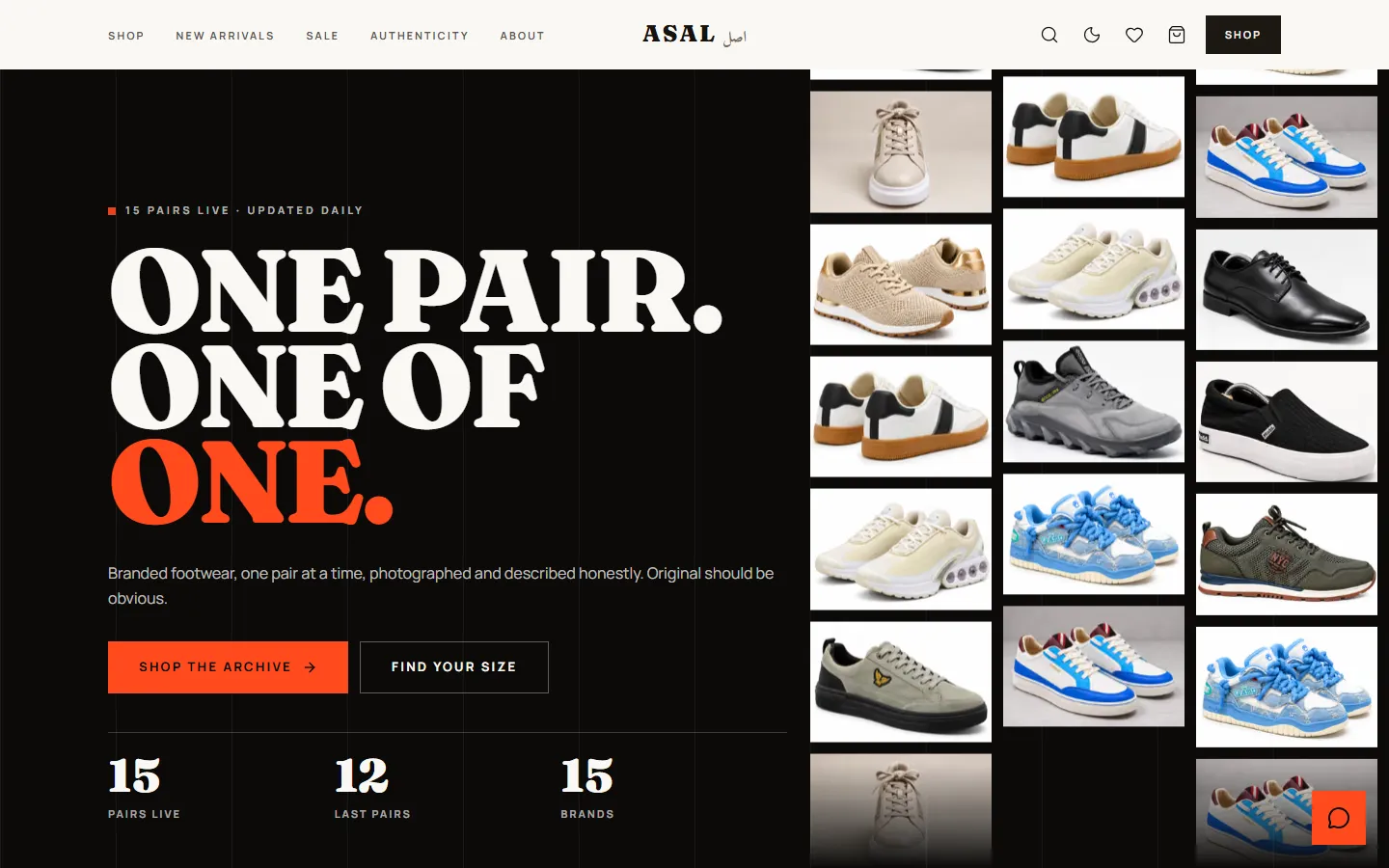
Open a real store we built and look at how it works: the storefront, the catalogue, and what sits behind them. Switch between desktop and phone.

Explore ASAL

Client work

ASAL home page: a bold headline beside a grid of footwear photos

Screenshots of the live store, taken October 2026. The product photos and brand names belong to the store.

The storefront

A confident home page: one idea, a live count of what is in stock, and a wall of photographs that leads into the shop.

  • A counter strip shows pairs live, last pairs and brands

    Seen on the live store

  • Clear entry points: shop the collection, or find your size

    Seen on the live store

  • A cookie notice that lets visitors decline analytics

    Seen on the live store

  • The layout reflows for a phone, with a bottom navigation bar

    Seen on the live store

Software / Founder-built

Edgebook, a journal for every market you trade.

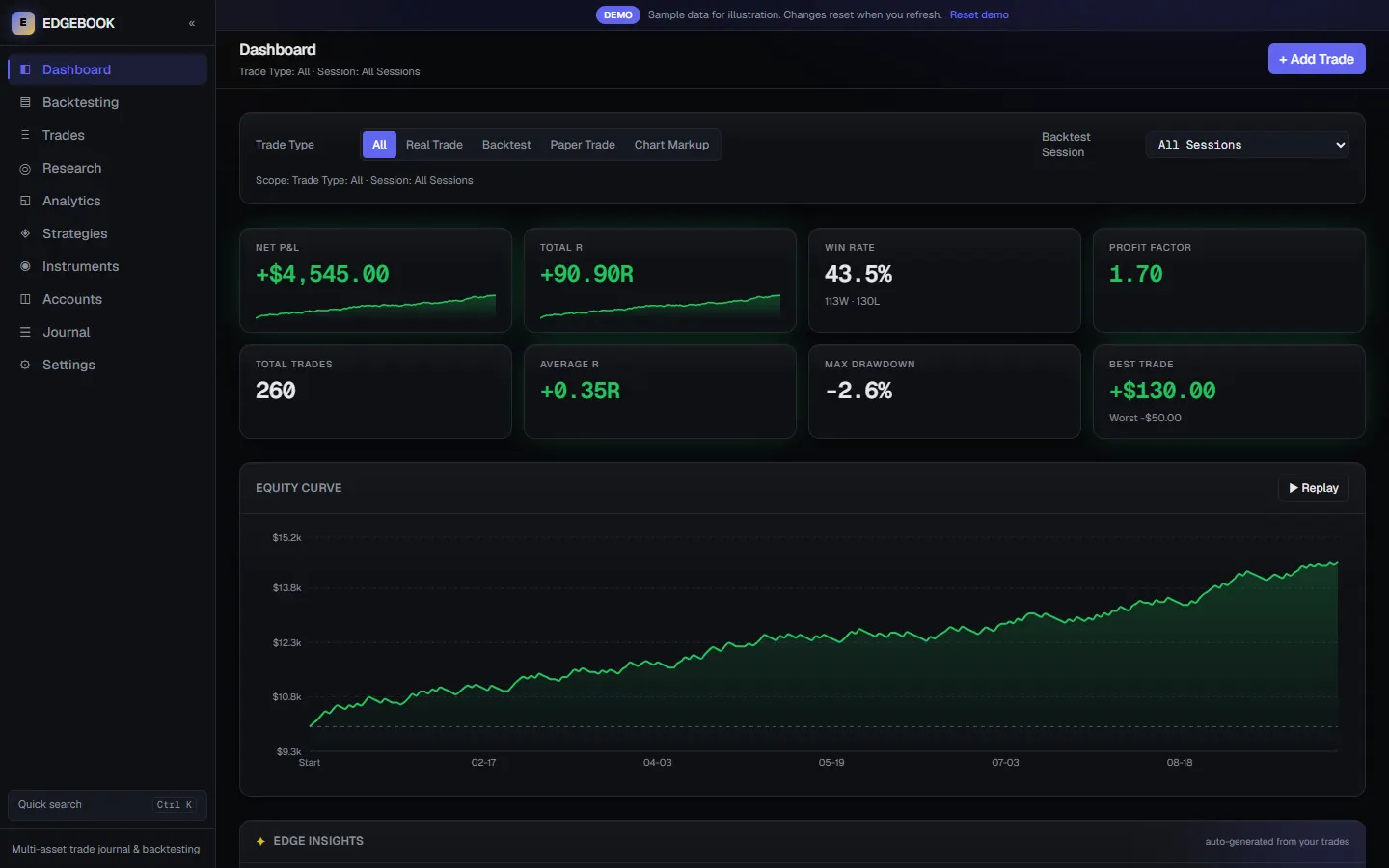
A multi-asset trading journal and backtesting workbench. Log each setup as structured data across gold, forex, crypto, indices and stocks, then review which setups, sessions and habits show up in the results.

Founder-builtPersonal projectSimulated demo data

Screen

Instrument

Changes the screen on the right to that market.

Interactive demo with simulated sample data. Figures shown are not real trading results.

Edgebook dashboard screen for all markets, showing the demo's simulated sample data

Swipe the screenshot to pan. Screenshots of the live demo, taken October 2026. The data is simulated sample data for illustration, not real trading results, and nothing here is financial advice.

Dashboard

The review screen. Pick an instrument and the whole view follows it: key figures, the equity curve, and insights drawn from the journal.

Showing: All markets

  • Key figures and an equity curve with a replay button

    Seen in the live demo

  • Edge insights generated automatically from the logged trades

    Seen in the live demo

  • Filter by trade type (real, backtest, paper or chart markup) and by session

    Seen in the live demo

  • Switch the view to one market's session, or to the whole journal

    Seen in the live demo

Under the hood

  • Built with Next.js, React, TypeScript, Tailwind CSS, Zustand and Recharts, with automated tests

    From the project's README and code

  • One shared calculation layer, so every page shows the same numbers

    From the project's README and code

  • The demo runs on 260 simulated trades across four markets, with no server sync and a reset button

    From the project's README and code

Explore the live journal (opens the live demo in a new tab)Project detailsWant something like this? Start a project

A founder-built personal project, not client work. The source code is private.

What we build

Nine software development services, in detail.

Each one says what it is, who it suits and what you receive. Every service has a direct way to start the conversation, with the form already filled in for it.

01

Business and corporate websites

A clear, fast site that explains what you do and gives people an obvious next step.

For most businesses the website is the first impression and the first sales conversation. We plan the pages around the questions your visitors actually have, then design and build them to load quickly and read well on a phone.

Good for

  • A business launching a site for the first time
  • A company whose current site is slow, dated or hard to update
  • A services firm that needs to look credible before the first call

You receive

  • Page and content structure
  • Responsive design
  • The built, tested site
  • Search basics: titles, descriptions, sitemap
  • Launch and handover

02

E-commerce

A storefront and checkout built around how your customers actually buy.

Catalogue, cart, checkout and the back-office to run it. We keep the buying path short, connect the payment and shipping tools you use, and make sure you can manage products and orders without help.

Good for

  • A brand moving from marketplaces to its own store
  • A shop that needs a faster, simpler checkout
  • A business adding online sales for the first time

You receive

  • Storefront design
  • Product, cart and checkout flow
  • Payment and shipping connections
  • Order management
  • Launch and handover

03

SaaS and web applications

From a first usable version to a product you can grow.

Accounts, roles, dashboards and the core workflow your product exists for. We start with the smallest version that proves the idea, then build on it in stages you can see and use.

Good for

  • A founder turning an idea into a first product
  • A business productising an internal process
  • A team replacing a patchwork of tools with one application

You receive

  • Scope and user flows
  • Interface design
  • Working application with accounts and roles
  • Billing, if your product needs it
  • Documentation for handover

04

Admin systems and business tools

Internal tools that replace spreadsheets and give your team one place to work.

Orders, inventory, bookings, approvals, reporting: the daily work of running a business, in one system with the right people seeing the right things.

Good for

  • A team running operations from spreadsheets and chat
  • A business with a process only one person understands
  • An operation that needs reporting it cannot get today

You receive

  • Workflow mapping
  • Dashboards and data screens
  • Roles and permissions
  • Reports and exports
  • Training notes for your team

05

Mobile apps

Phone-first experiences that share their backbone with your web product.

For products people use on the move. We design for thumbs and small screens first, and connect the app to the same data and accounts as your web product where you have one.

Good for

  • A product whose users are mostly on phones
  • A web product that needs a companion app
  • Field or on-site teams who need to capture data away from a desk

You receive

  • App flows and design
  • The built app for the platforms you need
  • Backend connection
  • Testing on real devices
  • Release support

06

Integrations and automation

Connect the tools you already use so work moves without retyping.

Payments, CRMs, accounting, messaging and other services talk to each other through their APIs. We connect them, so a sale, a booking or a form submission lands where it needs to go.

Good for

  • A business copying data between systems by hand
  • A product that needs to plug into third-party services
  • A team that wants routine steps automated

You receive

  • Integration plan
  • Built and tested connections
  • Error handling and alerts
  • A plain-language description of what runs when

07

Trading and fintech platforms

Data-dense interfaces that stay clear when the numbers keep changing.

Dashboards, accounts, positions and live prices need strict hierarchy and careful handling of data. We build the interface and the systems behind it, and we are straightforward about what needs specialist or regulatory input.

Good for

  • A team building a trading or investment product
  • A fintech product that needs a clear dashboard
  • A platform that must show live data without overwhelming users

You receive

  • Interface design for dense data
  • Live data handling
  • Account and role structure
  • Testing with realistic data
  • Notes on compliance questions to raise early

08

Real-time applications

Live dashboards, chat and collaboration where every second counts.

Anything that has to update as it happens: notifications, shared boards, live status, messaging. We design for the moment the data changes, not only the page after a refresh.

Good for

  • A product with live status or tracking
  • A team tool where several people work at once
  • A service that needs instant notifications

You receive

  • Real-time architecture
  • Live interface
  • Load and failure testing
  • Monitoring notes for after launch

09

Maintenance, optimisation and support

Keep what you have running well: fixes, speed, updates and the next round of improvements.

Software needs looking after once it is live. We can fix issues, update dependencies, speed up slow pages and screens, and keep adding the features your users ask for. What support is included, and how quickly we respond, is agreed in writing for each project.

Good for

  • A site or app that has become slow or fragile
  • A product that needs steady improvements after launch
  • A team without a developer on call

You receive

  • A review of what is there now
  • Fixes and updates
  • Performance improvements
  • A plan for the next iterations

Launching a product? It usually needs a story too. See our video production and editing work, or browse all labelled work.

How projects work

Five stages, one step at a time.

Every project, software or video, moves through the same stages, so you always know what has happened, what is next, and what we need from you.

  1. 01

    First conversation

    We start by listening.

    • We ask about your goal, your audience and your constraints
    • You tell us what already exists: a site, footage, brand material
    • We say honestly whether we are the right fit
    You provide
    Your goal, examples you like, any deadline that matters
    You receive
    A frank view of fit, and a clear next step
  2. 02

    Plan

    We agree the work before it starts.

    • We write down what is included and what is not
    • We break the work into stages you can review
    • We list what we need from you and when
    You provide
    Review and sign-off on the plan
    You receive
    A written plan and estimate
  3. 03

    Build or produce

    You see the work as it takes shape.

    • Software: working builds you can click through, in stages
    • Video: script and storyboard first, then a rough cut, then the final edit
    • Feedback is gathered at each stage so changes happen early
    You provide
    Feedback at each stage, and the material we ask for
    You receive
    Work to review at every stage, not only at the end
  4. 04

    Review and launch

    We finish it properly and hand it over.

    • Final checks and fixes
    • Software goes live, or video is exported in the agreed formats
    • Handover of what you need to run it
    You provide
    Final approval
    You receive
    The finished work and the files or access to run it
  5. 05

    Support

    The next stage always comes.

    • Fixes and questions after launch
    • Next iterations and new ideas
    • What support is included is agreed in the plan
    You provide
    Questions, results you see, ideas for what is next
    You receive
    Help after launch, as agreed

Questions

Straight answers.

The things people ask before they write. If yours is not here, ask it in your enquiry.

What kinds of projects do you take on?

Software and video. On the software side: business websites, e-commerce, SaaS and web applications, admin systems, mobile apps, integrations, and trading, fintech and real-time platforms. On the video side: UGC-style ads, AI cartoon ads, social ads, VSLs, product and corporate videos, YouTube content and editing. If your idea sits near these, ask.

Can I hire you for software and video together?

Yes. Many launches need both: something people can use and something that explains why they should. One conversation covers both, and the two pieces are planned to match.

How do I get started?

Send an enquiry from the Contact page. It takes a few short steps: what you need, a little about the project, and how to reach you. We reply with questions and a suggested next step.

How much will it cost?

It depends on the scope, so this site does not list fixed prices. Once we understand what you need, we put a plan and an estimate in writing. Sharing a budget is optional, and it helps us suggest the right scope.

How long will it take?

That depends on what is being made and how quickly we can get feedback and material from you. We give a timeline in the written plan. If you have a deadline, tell us in your enquiry.

Have a product in mind?

Tell us what you are building or making. We will reply with honest questions and a clear next step.

  1. 1

    You write. A short enquiry: what you need and a little about it.

  2. 2

    We reply. With questions and a suggested next step.

  3. 3

    We agree a plan. Written down, before any work starts.